


Table Of Contents
What Is Store Code in Google My Business (GBP) and Why It Matters for Multi-Location SEO
Managing multiple locations in Google Business Profile (GBP) previously known as Google My Business (GMB) requires accurate data and consistent identifiers. One powerful but often overlooked feature that helps with this is the Store Code.
In this guide, you’ll learn what a store code is, how it works within Google systems like Google Merchant Center, Local Inventory Ads, and Google Ads, and why it’s essential for improving your local SEO and multi-location management.
What Is a Store Code in Google Business Profile?
A store code (also known as a GMB store code or GBP store code) is a unique identifier assigned to each physical business location you manage within your Google Business Profile Manager.
According to Google’s official documentation, any unique identifier such as a name, number, or alphanumeric combination can serve as your store code, as long as it consistently represents the same location.
Store codes are not visible to the public. They’re only seen by business owners or managers inside the Google Business dashboard and are primarily used for internal organization, data synchronization, and local ad performance tracking.
Why Store Codes Are Important
For single and multi-location businesses, store codes provide several strategic advantages:
| Purpose | Benefit | Connected Google Entity |
|---|---|---|
| Accurate Location Identification | Helps you easily manage and distinguish multiple store listings. | Google Business Profile |
| Integration with Local Inventory Ads | Required field when uploading your local product inventory feed in Google Merchant Center. | Google Merchant Center |
| Campaign Tracking & Geo-Targeting | Enables tracking by store in Google Ads for local campaigns. | Google Ads |
| Data Consistency Across Systems | Keeps CRM, POS, and inventory systems synchronized. | Google Cloud / Merchant APIs |
| Error Prevention | Prevents duplicate or mismatched locations during bulk upload or spreadsheet updates. | Google My Business Bulk Upload Tool |
If your business runs Local Inventory Ads, store codes are required to match the [store_code] attribute in your local product inventory feed with the same store code in your GBP account.
How to Find or Add a Store Code in Google Business Profile
Follow these steps to locate or assign store codes:
Option 1: From Your Manage Locations Page
Log in to your Google Business Profile Manager.
Go to the Manage Locations dashboard.
Locate your store the Store Code appears beside each listing.
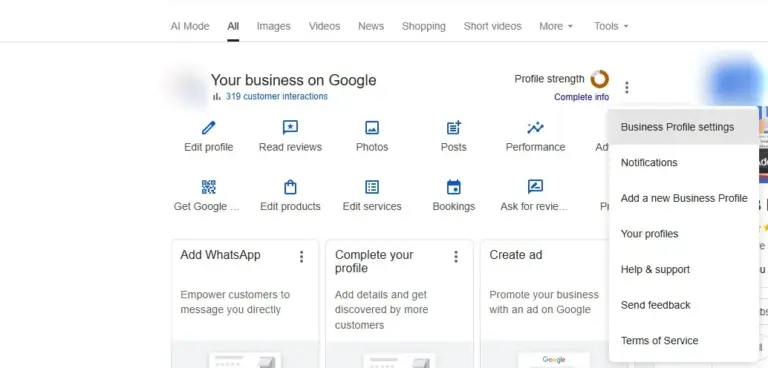
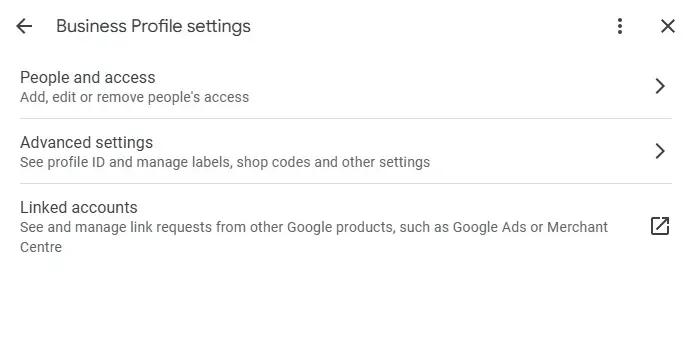
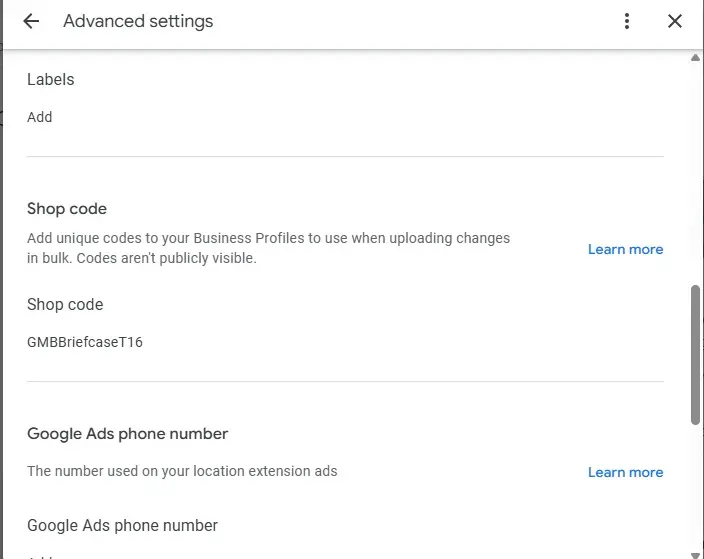
Option 2: From the Info Tab
Open your desired location in Google Business Profile.
Click the Info tab.
Scroll down to Advanced Information.
You’ll find the Store Code field — here you can add, view, or edit the code.
To Add a New Store Code
Click the pencil ✏️ icon next to Store Code.
Enter a code (e.g., CBP-NYC01 or SHOP01).
Click Apply to save changes.
Best Practices for Creating Store Codes
Use these guidelines to create consistent, meaningful store codes:
Keep them unique: Each location must have a distinct identifier.
Use your brand name or city: Example — BRAND-NY01, BRAND-LA02.
Maintain consistency: Match store codes across your CRM, POS, and Google feeds.
Avoid symbols or spaces: Stick to letters, numbers, and dashes.
Reflect internal systems: Align store codes with your internal naming conventions.
Advanced Use Cases for Store Codes
Store codes aren’t just organizational tools they can enhance your overall local marketing strategy.
| Use Case | Description | Example |
| Local Inventory Ads Integration | Required attribute [store_code] must match GBP code for feed approval. | store_code: BRAND-NY01 |
| Google Ads Geo-Targeting | Helps assign location extensions to the correct branch in Google Ads. | Track store-level conversions. |
| Google Merchant Center Sync | Links physical store data with online product availability. | Show “in-stock nearby” listings. |
| Analytics and CRM Reporting | Enables detailed, location-based insights when synced with Google Analytics 4 (GA4). | Track visits, calls, or direction requests per store. |
| Multi-Location SEO | Keeps NAP (Name-Address-Phone) consistent across all business listings. | Supports Local Map Pack accuracy. |
Store Code vs. Place ID vs. Location ID
| Feature | Store Code | Place ID | Location ID |
| Purpose | Internal GBP management & feed synchronization | Identifies a place in Google Maps API | Used in Google Ads for campaign mapping |
| Visibility | Private (only in GBP) | Public (for Maps developers) | Internal (Google Ads only) |
| Customization | Fully customizable | Auto-generated by Google | Auto-generated by Google |
| Best For | Multi-location management, local inventory ads | App integrations, location data | Ads performance tracking |
Common Store Code Mistakes to Avoid
Using duplicate codes for multiple stores.
Forgetting to match
[store_code]between GBP and Merchant Center feed.Changing store codes frequently – causes data inconsistencies.
Leaving the field blank in bulk uploads (creates errors or duplicates).
Ignoring case sensitivity – “storecode1” ≠ “StoreCode1”.
How Store Codes Support Local SEO
Although customers can’t see your store codes, they play a hidden yet crucial role in local SEO:
Help Google connect multiple locations correctly for brand entities.
Ensure accurate data for Google Maps, Local Pack, and Knowledge Panel listings.
Enable advanced tracking for GA4, Google Ads, and Merchant Center integrations.
Improve efficiency when updating location data via API or bulk upload.
Together, these benefits create stronger entity consistency something increasingly recognized in AI Overviews and Search Generative Experiences (SGE).
Expert Tip: Schema and Structured Data
Enhance your visibility by adding structured data (schema.org markup) for:
LocalBusinessorStoretypeInclude name, address, telephone, and store code
Use FAQPage schema for common store code questions
Add HowTo schema for the step-by-step process
These elements help Google’s Knowledge Graph understand your brand entities and improve eligibility for Featured Snippets and AI Overview summaries.
Take Action: Optimize Your GBP Store Codes Today
Whether you manage one shop or a nationwide franchise, store codes make your Google Business Profile data cleaner, more consistent, and better connected with Google Merchant Center, Google Ads, and Google Maps.
Need help setting up or managing store codes across multiple locations?
Citation Builder Pro can help you optimize your GBP store codes, local listings, and multi-location SEO setup for maximum visibility.
Contact us today to streamline your business profile and strengthen your local presence on Google.
FAQs About Store Codes in Google Business Profile
Q1: Is the store code visible to customers?
Ans: No. Store codes are internal identifiers used only by managers inside the Google Business dashboard.
Q2: Do I need store codes for a single-location business?
Ans: Not necessarily, but adding one can help with future expansion or inventory feeds.
Q3: Can I edit my store code later?
Ans: Yes, you can edit or replace it anytime in the Info → Advanced Information section.
Q4: Is the store code required for local inventory ads?
Ans: Yes. The [store_code] in your local product inventory feed must match the store code in your GBP profile
Boost Your Google Business Profile Performance 🚀
Optimize your Google My Business (GMB) listings, manage store codes efficiently, and increase visibility in local search results.
How useful was this post?
Average rating 5 / 5. Votes: 1
No votes so far! Be the first to rate this post.

I am the founder of Citation Builder Pro. I have been in the SEO and content marketing industry for 15 years and have a lot of experience in public relations and online marketing.
I started Citation Builder Bro to help businesses of all sizes create high-quality citations for their websites. My team and I are dedicated to providing our clients with the best possible services.